Routing

There are two crosspoint matrixes available in one for managing all the audio sources and sink and a second one for GPIO routing. Both can be accessed by clicking on the router icon or by pressing ctrl + r
Audio routing

With the audio router you can connect the input and outputs of your SIP accounts and sound devices with each other. The router is a fully functional summing matrix this means you can add multiple inputs to one single output.
Crosspoint type |
description |
|---|---|

|
A green crosspoint without text that indicates a connection without any gain change |

|
the gain or attenuation is indicated directly on the crosspoint (value in dB) |

|
a gray crosspoint is a temporary crosspoint that is non constistent over a restart of the application. |
A click on a white square sets a crosspoint and a click on a crosspoint cleas the connection.
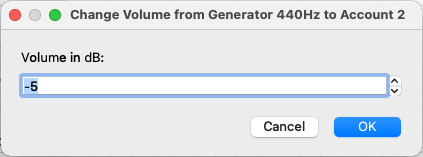
With a right click on a crosspoint you can alter the gain of this connection. A negative value is an attenuation of the signal and a positive value is a signal boost.

When you need to set multiple crosspoints with a gain other than 0dB you can change the default volume setting at the bottom of the window.

By checking the temporary Route checkbox each new crosspoint will just be temporary. (indicated with a grey crosspoint) A temporary crosspoint is not saved in the configuration. It will be lost after a reboot of the codec.
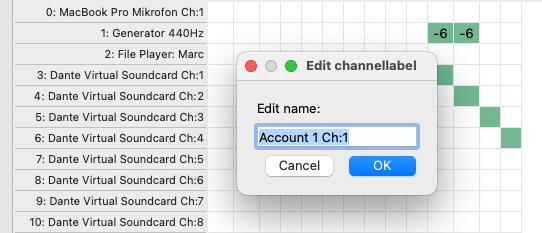
With a double click of a name (either input or output) a window opens where you can change the name of a channel.
GPIO routing
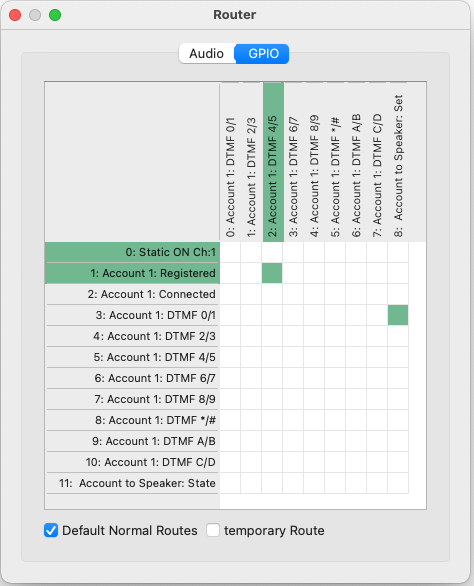
All GPIO devices can be connectet in the GPIO matrix. A source or a destination that is maked green has the state true or hi.
Crosspoint type |
description |
|---|---|

|
A green crosspoint without text that indicates a connection. |

|
A xrosspoint with a ! is an inverting crosspoint. A true on the source will be a false on the destinatiln and vice versa. |

|
a gray crosspoint is a temporary crosspoint that is non constistent over a restart of the application. |
Note
THe account DTMF GPI devices are only avaliable when they are enabled in the account config. See secction accounts for details.